


X-DRAW vs AutoCAD for Fire Alarm System Design Which Is Better
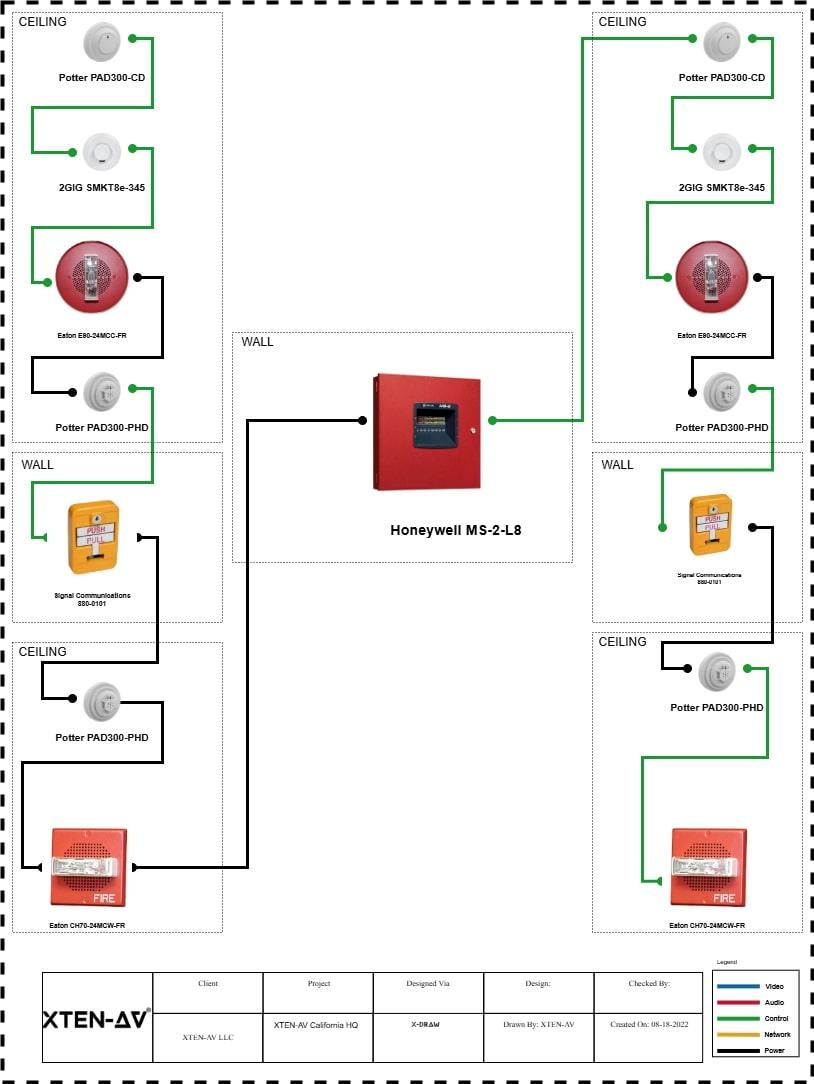
XTEN-AV is transforming the AV and safety design industry with its advanced tools and automation solutions, including X-DRAW, a powerful Fire Alarm System Design Software. For decades, AutoCAD has been the go-to choice for engineers and designers across industries, including fire protection. However, as technology advances and design needs become more specialized, tools like X-DRAW are redefining how professionals approach fire alarm system layouts, documentation, and compliance.
In this blog, we will explore how X-DRAW compares with AutoCAD for fire alarm design projects, highlighting their strengths, differences, and why many modern engineers are choosing X-DRAW for precision and efficiency.
Introduction
Fire alarm design has evolved beyond just drafting lines and placing symbols. Today, engineers need intelligent design tools that can automate calculations, ensure code compliance, and integrate seamlessly with project workflows. Traditional CAD software, like AutoCAD, provides flexibility and control over drawing, but it often requires manual input, symbol libraries, and additional plugins for specialized systems.
In contrast, next-generation Fire Alarm System Design Software such as X-DRAW combines smart automation, pre-built templates, and intuitive interfaces to simplify the design process. It is built specifically for life safety system designers, offering tools tailored to fire alarm layouts, device configuration, and documentation.
So which one should you use for your next fire alarm design project? Let us break down both platforms to help you decide.
Understanding AutoCAD for Fire Alarm Design
AutoCAD, developed by Autodesk, is one of the most widely used design and drafting software in the world. It is known for its versatility and powerful drawing tools that allow users to create detailed 2D and 3D models for engineering, architecture, and construction projects.
When it comes to fire alarm design, AutoCAD allows designers to manually create floor plans, add device symbols, and label circuits. Many engineering firms rely on AutoCAD because of its industry familiarity and its ability to integrate with BIM platforms like Revit.
However, using AutoCAD for fire alarm design also comes with limitations. The process is often manual, time-consuming, and requires specialized fire protection knowledge. Users must import their own symbol libraries or rely on third-party add-ons to perform tasks like device placement and circuiting. AutoCAD is a general-purpose CAD tool, not a dedicated Fire Alarm System Design Software, which means engineers spend more time configuring tools than designing systems.
Introducing X-DRAW The Future of Fire Alarm Design
X-DRAW by XTEN-AV is a modern, web-based design platform built to simplify and automate the process of creating fire alarm system drawings. It is designed specifically for AV and safety professionals who need accuracy, speed, and compliance in their projects.
Unlike AutoCAD, X-DRAW is not just a drawing tool but a complete design ecosystem. It enables users to create smart diagrams, automatically link devices, and generate bills of materials without complex setups or manual calculations. As a specialized Fire Alarm System Design Software, X-DRAW focuses on the unique needs of fire alarm engineers by providing intelligent automation, real-time collaboration, and seamless integration with system documentation workflows.
Key Comparison X-DRAW vs AutoCAD
Let us examine the main differences between X-DRAW and AutoCAD in the context of fire alarm design.
1. Ease of Use
AutoCAD is a professional-grade CAD program with a steep learning curve. Fire alarm designers must create custom templates, symbol libraries, and layers manually before starting a project.
X-DRAW, on the other hand, offers an intuitive drag-and-drop interface with pre-built fire alarm symbols and templates. Designers can start projects instantly without complex configurations. Its web-based environment makes it accessible from any device, eliminating the need for heavy software installations.
2. Automation and Intelligence
In AutoCAD, every device, connection, and label must be added manually. Calculations for device spacing, load distribution, and circuiting require separate tools or manual effort.
X-DRAW automates these steps. It can auto-route connections, generate reports, and ensure design consistency across multiple floors or building zones. With intelligent placement and validation tools, errors are minimized, and revisions become easier.
3. Code Compliance and Documentation
Fire alarm systems must comply with codes like NFPA 72 or BS 5839. AutoCAD alone does not include code validation features. Designers must manually ensure compliance and rely on checklists or experience to verify spacing, device types, and labeling.
X-DRAW incorporates compliance-driven design logic. It helps users design systems that align with international fire safety codes and automatically generates detailed documentation, including device lists, wiring schedules, and layout diagrams ready for submittals.
4. Collaboration and Accessibility
AutoCAD projects are typically stored on local systems, making collaboration challenging. Team members must exchange large files through shared drives or email, which slows down workflows.
X-DRAW is cloud-based, allowing multiple users to collaborate on the same project in real-time. Team members can review, edit, and approve designs instantly, regardless of location. This cloud-based setup also ensures automatic version control and secure data storage.
5. Integration with Other Systems
While AutoCAD supports integration with other Autodesk products like Revit, it requires additional setup and licensing. For non-Autodesk users, interoperability can be limited.
X-DRAW integrates seamlessly within the XTEN-AV ecosystem, connecting with tools for project management, documentation, and quoting. This makes it easy to move from design to execution without switching platforms or duplicating data.
6. Cost and Maintenance
AutoCAD is a powerful but expensive tool that often requires annual licensing, maintenance fees, and hardware upgrades. Fire alarm designers who only need it for specific projects may find it costly and resource-heavy.
X-DRAW, being cloud-based, offers flexible subscription plans without hardware requirements. Updates are automatic, ensuring users always have access to the latest features without added maintenance costs.
When to Use AutoCAD
AutoCAD remains an excellent option for professionals who:
-
Work on multidisciplinary projects involving architecture and MEP systems.
-
Require advanced 3D modeling and custom detailing.
-
Already have established workflows using Autodesk products.
However, for fire alarm design alone, AutoCAD may provide more functionality than necessary, increasing complexity without direct benefits for code compliance or automation.
When to Use X-DRAW
X-DRAW is ideal for fire alarm system designers, consultants, and contractors who:
-
Want to automate device placement, wiring, and reporting.
-
Need code-compliant design templates for faster delivery.
-
Prefer a lightweight, web-based platform without software installations.
-
Work in collaborative environments where multiple users share project access.
For teams that handle repetitive fire alarm design tasks across multiple projects, X-DRAW drastically reduces design time while improving accuracy and documentation.
The Future of Fire Alarm Design
As building safety systems become smarter and more integrated, the demand for automation-driven design tools is increasing. Designers no longer have time for manual drafting and repetitive calculations. They need intelligent software that adapts to modern workflows.
Platforms like X-DRAW represent the future of fire alarm system design by combining the power of CAD with automation, collaboration, and compliance in one platform. While AutoCAD remains a solid foundation for general drafting, specialized software like X-DRAW delivers speed, precision, and purpose-built functionality that traditional tools cannot match.
Conclusion
Choosing between X-DRAW and AutoCAD ultimately depends on your project needs and workflow priorities. If you require a specialized Fire Alarm System Design Software that saves time, reduces errors, and ensures compliance, X-DRAW offers clear advantages.
XTEN-AV has built X-DRAW to address the real challenges fire safety professionals face today, empowering them to design systems faster, smarter, and with greater confidence. For teams still relying on manual CAD processes, the shift to an automated, cloud-based solution like X-DRAW is not just an upgrade it is the next evolution in fire alarm system design.

 English
 Arabic
 Français
 Español
 Português
 Deutsch
 Türkçe
 Italiano
 Russian
 Romaian