


How to Export Email Addresses from PST Files Quickly
Are you sitting on a treasure trove of email addresses stored in your PST files and wondering how to unlock them? If you're dealing with an Outlook Personal Storage Table (PST) file, you’re not alone. Many users find themselves needing to extract valuable contact information from these files for various purposes—be it marketing campaigns, networking, or simply organizing their contacts.
As digital communication continues to dominate our lives, having easy access to accurate email addresses can be a game-changer. Whether you're looking to connect with old colleagues or expand your business outreach, knowing how to export email addresses from PST files quickly is essential. Let's dive into the world of PSTs and discover effective methods that will save you time and hassle!
Understanding PST Files and Email Addresses
PST files, or Personal Storage Table files, are created by Microsoft Outlook to store emails, contacts, calendars, and other personal data. These files play a crucial role in managing your email accounts efficiently.
Email addresses within PST files can be valuable assets. They often contain connections from years of communication—friends, colleagues, clients—all stored neatly in one location.
Navigating through these archives can feel like sifting through a digital attic. Yet that effort is worthwhile when you consider how many relationships and opportunities might be hidden inside.
Understanding the structure of PST files makes it easier to extract relevant contact information without unnecessary headaches. With the right approach and tools at your disposal, accessing those email addresses becomes much more straightforward.
The Benefits of Exporting Email Addresses from PST Files
Exporting email addresses from PST files offers significant advantages for both individuals and businesses. It helps consolidate communication channels, making it easier to manage contacts in one place.
One major benefit is the ability to streamline marketing efforts. With organized email lists, targeted campaigns can be executed more efficiently. This leads to improved engagement rates and better conversion potential.
Additionally, exporting allows for backup solutions. Keeping a copy of important contacts ensures that information isn’t lost during software updates or system crashes.
PST file exports also facilitate collaboration among team members. Sharing relevant email addresses enhances teamwork and simplifies project management by ensuring everyone has access to essential contacts.
Moreover, this process aids in data migration when switching platforms or services. Transitioning becomes seamless with well-organized contact details at hand, saving time and reducing stress associated with moving critical information.
Different Methods of Exporting Email Addresses from PST Files
When it comes to exporting email addresses from PST files, you have several options at your disposal.
Using Microsoft Outlook is one of the most straightforward methods. With its built-in export feature, you can easily navigate through menus and select the contacts you'd like to extract.
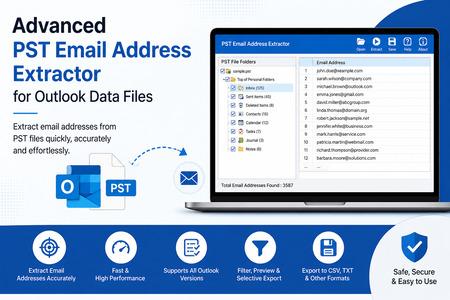
Another method involves third-party software tools designed specifically for PST file management. These programs often offer advanced features that enhance efficiency and accuracy during the extraction process.
If you're comfortable with tech, scripts, or command-line utilities provide a more customizable approach. This allows you to tailor the extraction based on specific criteria suited to your needs.
Considerations such as data volume and desired format also play a role in choosing the right method for your situation. Each option presents unique advantages depending on what works best for you and your workflow preferences.
Step-by-Step Guide to Exporting Email Addresses from PST Files
To export email addresses from PST files, begin by opening Microsoft Outlook. Ensure your PST file is imported into the application.
Next, navigate to the "File" tab and select "Open & Export." Here, choose "Import/Export" to launch the Import and Export Wizard.
Select “Export to a file” and click “Next.” Choose “Comma Separated Values” (CSV) as your format for easy access later.
Now, highlight your email account or folder containing the contacts you want. Click “Next,” then decide where to save the exported CSV file on your device.
Before finalizing, ensure that you map custom fields if needed. This step helps maintain organization in your contact list.
Once done, hit “Finish.” Your email addresses are now extracted and ready for use!
Tips for Efficiently Organizing Exported Email Addresses
Once you've exported email addresses from PST files, the next step is organization. A well-structured system can save you time and enhance your communication efforts.
Start by categorizing email addresses based on specific criteria. You might group them by purpose, such as personal contacts, professional connections, or marketing leads. This way, retrieving information becomes easier when needed.
Next, consider creating a spreadsheet for better visibility. Tools like Excel or Google Sheets allow you to sort and filter entries quickly. Add columns for additional details like names or company affiliations.
Don't forget about regular updates. Periodically review your list to eliminate duplicates or outdated contacts. Keeping your database fresh ensures effective outreach in future campaigns.
Back up your organized list in multiple formats—CSV files are great for versatility across platforms. Protecting this data will prevent loss and keep it accessible whenever required.
How to Use the Exported Email Addresses
Once you’ve successfully exported email addresses from PST files, the next step is to put them to good use. Start by importing these addresses into your preferred email marketing platform. This allows you to reach a larger audience with tailored campaigns.
Consider segmenting your contacts based on their interests or demographics. This targeted approach often leads to better engagement and conversion rates.
If you're running a newsletter, utilize the exported emails for regular updates or informative content. Consistency builds trust and keeps your audience engaged over time.
You can also explore creating custom mailing lists for specific events or announcements. Personalization can significantly enhance user experience and interaction.
Always ensure compliance with data protection regulations when using these email addresses for outreach purposes. Respecting privacy fosters goodwill and long-term relationships with your contacts.
Conclusion
Exporting email addresses from PST files can significantly streamline your communication efforts. By understanding the nature of PST files and utilizing effective methods for extraction, you open the door to better organization and outreach.
Whether you're using built-in features in applications like Microsoft Outlook or third-party tools, there are several ways to achieve this task efficiently. The importance of organizing these exported contacts cannot be overstated; a well-structured contact list enhances your marketing strategies and ensures that you reach the right audience.
With careful handling of the data and strategic planning for its use, those extracted email addresses can become valuable assets for both personal and professional endeavors. Embracing this process empowers you to maximize your connections while minimizing time spent on manual tasks.

 English
 Arabic
 Français
 Español
 Português
 Deutsch
 Türkçe
 Dutch
Dutch
 Italiano
 Romaian