


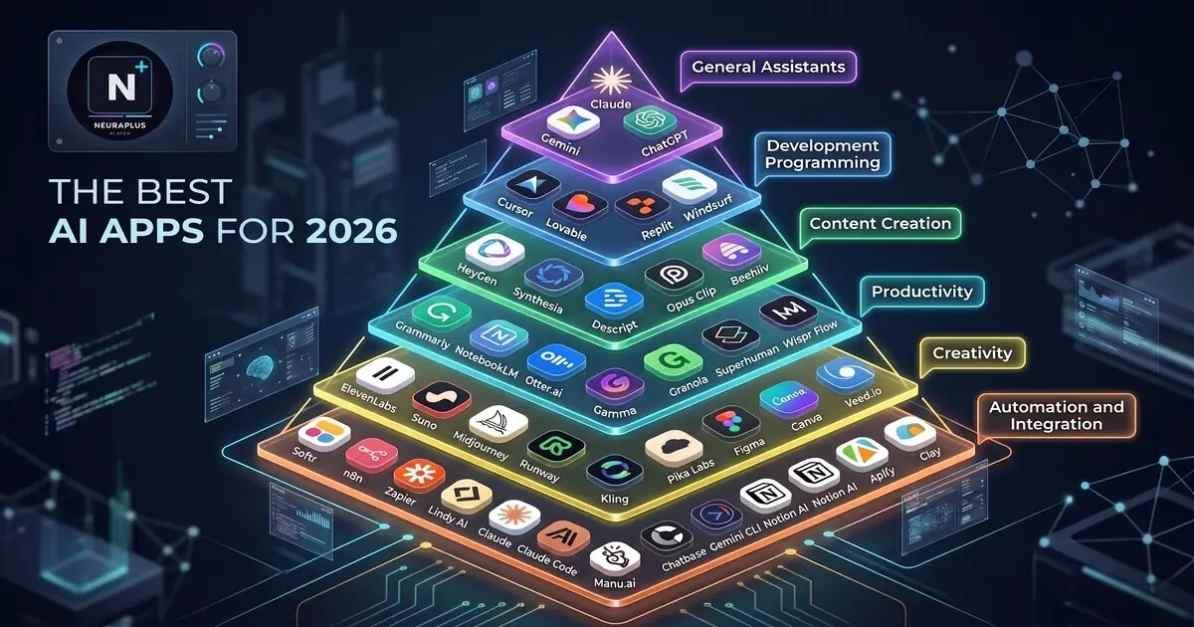
Your Android phone can do much more than messaging, browsing, and watching videos. In 2026, AI apps are turning smartphones into powerful personal assistants that can help with writing, research, studying, creativity, productivity, communication, and everyday tasks.
But with hundreds of AI-powered apps available, finding the right ones can be confusing.
In this guide, we'll explore the Best AI Apps for Android 2026 and explain what each type of tool is useful for, who should use it, and how AI can help you get more done from your phone.
Why AI Apps Are Becoming Popular on Android
AI is becoming part of everyday mobile workflows.
Instead of opening multiple apps and manually completing repetitive tasks, users can now rely on AI to help summarize information, write messages, generate ideas, translate languages, organize tasks, and create content.
For Android users, this means many AI capabilities are available directly from a smartphone.
Some of the most common uses include:
- Writing and editing
- Research and information discovery
- Note-taking
- Translation
- Image generation
- Video creation
- Studying
- Productivity
- Coding
- Business tasks
Best AI Apps for Android in 2026
1. ChatGPT
ChatGPT is one of the most versatile AI assistants available on Android.
You can use it for brainstorming, writing, learning, coding, research, summarization, planning, and everyday questions.
Best for: General-purpose AI assistance.
Whether you're a student, professional, creator, or business owner, having a general AI assistant on your phone can be extremely useful.
2. Google Gemini
Google Gemini is particularly useful for Android users who already use Google's ecosystem.
It can help with questions, writing, brainstorming, summarization, and other everyday AI tasks.
Best for: Android users who rely heavily on Google services.
Its integration with the broader Google ecosystem makes it an interesting choice for users who want AI alongside their existing mobile workflow.
3. Microsoft Copilot
Microsoft Copilot provides AI assistance for writing, research, brainstorming, and productivity.
It can be useful for professionals who already work with Microsoft products and services.
Best for: Productivity and workplace tasks.
4. Claude
Claude is known for its strong writing, reasoning, analysis, and coding capabilities.
On Android, users can interact with Claude while working away from their computer.
Best for: Writing, analysis, coding, and detailed answers.
It's particularly useful when you need help understanding a complicated topic rather than simply receiving a short answer.
5. Perplexity
Perplexity focuses heavily on AI-powered search and research.
Instead of manually opening multiple pages, users can ask a question and receive an organized response with supporting sources.
Best for: Research and information discovery.
It's useful for students, professionals, writers, and anyone who frequently researches topics from their phone.
6. Canva
Canva has incorporated a growing range of AI-powered creative features.
Android users can use it to create social media graphics, presentations, marketing materials, thumbnails, and other visual content.
Best for: Content creators and visual design.
You don't need to be a professional designer to create polished visuals with the help of templates and AI-assisted features.
7. Grammarly
Grammarly can help users improve writing while working on mobile devices.
It can identify grammar issues, improve clarity, and help make messages and documents easier to understand.
Best for: Writing and communication.
Students, freelancers, marketers, and professionals can use writing assistance when composing emails, posts, and other content.
8. Notion
Notion combines notes, documents, project management, databases, and AI-powered productivity features.
For users who want to organize work and information in one place, it can become a useful mobile workspace.
Best for: Organization and project management.
9. Otter.ai
AI transcription tools can turn spoken conversations into searchable text.
This can be useful for meetings, interviews, lectures, research, and personal notes.
Best for: Transcription and meeting notes.
10. AI Image and Video Apps
Android also offers a growing selection of AI-powered creative apps for generating and editing images and videos.
These tools can help creators:
- Generate visual concepts
- Remove backgrounds
- Edit images
- Create social media graphics
- Produce short videos
- Generate captions
- Repurpose content
Best for: Creators and social media users.
How to Choose the Right AI App
The best AI app isn't necessarily the one with the most features.
Think about what you actually need.
For Writing
Look for an app with strong editing, rewriting, brainstorming, and summarization features.
For Research
Prioritize tools that provide useful sources and make it easy to verify information.
For Productivity
Choose apps that integrate with your notes, calendars, documents, or existing workflow.
For Creativity
Look for AI image, video, design, and editing capabilities.
For Coding
Choose an assistant that can understand programming concepts, explain errors, and work with larger pieces of code.
How AI Apps Can Boost Productivity
The biggest advantage of mobile AI isn't simply answering questions.
It's reducing the amount of time spent on repetitive tasks.
For example, you can:
Before: Spend 30 minutes writing a professional email.
With AI: Create a draft in a few seconds and then personalize it.
Another example:
Before: Read a long document manually.
With AI: Get a summary first, then review the important sections yourself.
AI doesn't eliminate the need for human judgment. It helps you get through the first stage faster.
AI Apps for Students
Students can use AI apps for:
- Explaining difficult concepts
- Summarizing study material
- Creating practice questions
- Improving writing
- Learning languages
- Brainstorming project ideas
- Organizing notes
However, students should use AI as a learning assistant rather than simply copying answers.
AI Apps for Content Creators
Content creators can use Android AI apps throughout the entire production process.
A simple workflow could look like:
Idea → Research → Script → Image → Video → Caption → Publishing
AI can assist at nearly every stage.
This is especially useful for creators who manage everything from their phone.
AI Apps for Business Users
Small businesses and freelancers can use AI apps for:
- Customer communication
- Marketing ideas
- Content creation
- Research
- Meeting notes
- Data analysis
- Business planning
- Productivity
The ability to perform these tasks from a smartphone makes AI particularly useful for people who work remotely or travel frequently.
Are AI Apps Safe to Use?
AI apps can be extremely useful, but users should still think about privacy.
Avoid entering sensitive information such as:
- Passwords
- Financial information
- Private customer data
- Confidential business documents
- Personal identification information
Before using an AI application for sensitive work, review its privacy settings and policies.
Frequently Asked Questions
What is the best AI app for Android in 2026?
There isn't one universal winner. ChatGPT, Gemini, Claude, Copilot, Perplexity, and other apps each have different strengths.
Which AI app is best for productivity?
The best option depends on your workflow. General AI assistants can handle many tasks, while dedicated productivity apps can be better for notes, project management, or organization.
Can Android AI apps help with work?
Yes. AI apps can assist with writing, research, communication, planning, transcription, presentations, and many other workplace tasks.
Are AI apps free on Android?
Many AI apps offer free versions, while advanced features may require a paid subscription. Features and pricing can change over time.
Can AI apps replace traditional productivity apps?
Not necessarily. AI often works best alongside traditional tools rather than completely replacing them.
Final Thoughts
The Best AI Apps for Android 2026 aren't necessarily the apps with the biggest feature lists. The best tools are the ones that solve real problems and fit naturally into your daily routine.
Whether you need help writing an email, researching a topic, organizing your work, creating content, studying, or simply getting more done, there's likely an AI-powered Android app that can help.
The key is to choose a small number of reliable tools and learn how to use them effectively instead of downloading every new AI app that appears.
NeuraPulse AI shares practical guides on AI tools, automation, productivity, SEO, coding, and emerging technology to help creators, professionals, and businesses make smarter use of artificial intelligence.

 English
 Arabic
 Français
 Español
 Português
 Deutsch
 Türkçe
 Dutch
Dutch
 Italiano
 Russian