


Quote Revise in Odoo: Simplify Quotation Version Control and Sales Management
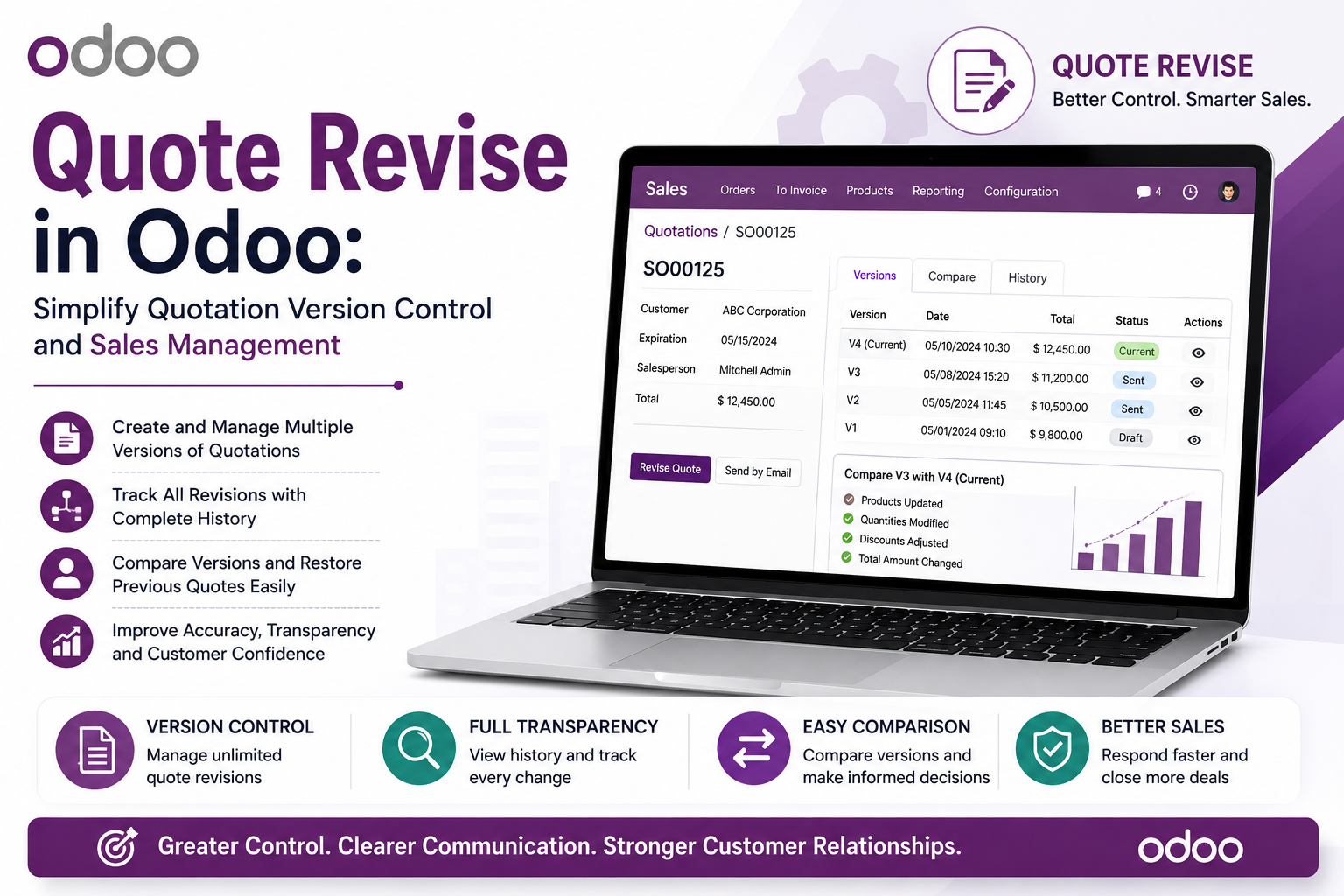
Sales quotations rarely remain unchanged from the first draft to the final agreement. Customers may request price adjustments, change quantities, remove products, or ask for different terms before approving a proposal. When these changes happen repeatedly, keeping track of every version can become challenging for sales teams.
This is where quote revise functionality becomes useful. QuoteRevise for Odoo introduces structured quotation version control, helping businesses preserve previous quotation versions, compare changes, restore earlier revisions, and track which version the customer confirmed. Instead of losing historical information when a quotation is edited, sales teams can maintain a clearer record of how the proposal evolved.
Why Quotation Version Control Matters
Imagine a salesperson creates a quotation and sends it to a customer. The customer requests several changes, so the salesperson updates the quotation and sends it again. Later, another price adjustment is requested.
If every change overwrites the previous quotation, it can become difficult to answer basic questions:
- What did the original quotation contain?
- Why was the quotation changed?
- What was different between two versions?
- Which version did the customer approve?
- What was the final agreed configuration?
A structured odoo quote revision history provides a reliable way to answer these questions. It allows sales teams to maintain historical versions rather than depending on emails, spreadsheets, or memory.
What Is Quote Revise in Odoo?
QuoteRevise is a quotation versioning plugin for Odoo designed to add revision management to the quotation workflow.
Instead of replacing the previous quotation whenever changes are made, the solution can preserve earlier versions as historical snapshots. Sales users can then create new revisions, provide reasons for changes, review version history, and compare different quotation versions.
This is particularly useful for businesses managing multiple quote versions during lengthy customer negotiations.
How Odoo Multiple Quote Versions Work
The revision workflow is designed to provide greater visibility throughout the quotation lifecycle.
Create a New Quotation Revision
Users can create a new revision from an existing quotation. A revision reason can also be recorded, helping teams understand why a particular version was created.
For example, a revision could be created because of:
- Customer-requested changes
- Price negotiation
- Product modifications
- Quantity adjustments
- Scope changes
This information becomes part of the quotation history.
Preserve the Previous Quotation Version
When a new revision is created, the earlier state can be preserved as a historical snapshot. This means the previous quotation version remains available for reference.
This is particularly valuable when customers return to an earlier proposal or when sales managers need to review how the quotation developed.
Compare Quotations in Odoo Side by Side
One of the useful capabilities of QuoteRevise is the ability to compare quotations in Odoo side by side.
When two versions need to be reviewed, users can compare their details and identify changes between them. This makes it easier to understand which products or quotation lines were added, removed, or modified.
The comparison can also be exported to Excel for additional analysis or sharing.
This functionality effectively provides a quotation diff Odoo workflow, helping sales teams understand the differences between quotation revisions without manually checking every line.
Track Which Version the Customer Confirmed
During negotiations, knowing which version the client approved is just as important as maintaining the revision history.
A customer may approve Version 3 after reviewing several proposals. Without proper tracking, the sales team may have difficulty determining exactly which quotation was accepted.
QuoteRevise supports quotation confirmation tracking, allowing teams to record information associated with the customer's confirmation, including the confirmed version and relevant confirmation details.
This creates a clearer connection between the negotiated quotation and the customer's final decision.
Key Features of Quote Revise
Quotation Change Log
A structured quotation change log helps sales teams understand how a proposal has evolved. Revision reasons and historical versions provide useful context when reviewing quotation changes.
Quotation Version History
The quotation's revision history provides a central location for reviewing previous versions. Users can access version information directly from the quotation.
Side-by-Side Version Comparison
Sales teams can compare different quotation versions to identify changes more efficiently. Excel export further supports detailed review and reporting.
Previous Version Restoration
Sometimes a customer wants to return to an earlier proposal. QuoteRevise allows users to restore a previous version while preserving the current state as another backup, helping maintain the overall history.
Dynamic Version or Revision Labels
Businesses can configure terminology such as Version or Revision according to their preferred sales terminology. These labels can also be displayed on customer-facing PDF printouts.
Quotation Revision Analytics for Odoo
Maintaining historical versions can also provide useful information for understanding the sales process.
For example, businesses may be interested in metrics such as average revisions required before a quotation reaches confirmation. Tracking revision activity can help sales managers understand how frequently proposals change during negotiations.
While version history primarily provides operational visibility, the accumulated revision information can also support quotation revision analytics for Odoo and help organizations identify recurring patterns in their quotation process.
Sale Order Versioning Odoo: Understanding the Relationship
Quotation revisions are closely connected to the broader sales workflow. Once a quotation is accepted, it can move forward into the sales order process.
For organizations searching for sale order versioning Odoo, it is important to distinguish between quotation revision management and general sales order processing. QuoteRevise focuses on maintaining and managing quotation versions before and around customer confirmation, providing greater visibility into how the commercial proposal evolved.
Benefits of Odoo Quote Revision History
A structured revision process can provide several practical benefits:
- Better quotation version control
- Easier access to previous proposals
- Faster comparison of quotation changes
- Clearer customer confirmation records
- Improved sales team collaboration
- Better visibility into negotiation history
- Reduced dependency on emails and spreadsheets
- More organized quotation management
These benefits become increasingly important when sales teams manage complex proposals or multiple rounds of negotiation.
Who Can Benefit from a Quotation Versioning Plugin?
Businesses that frequently modify quotations can benefit from structured version management. This includes manufacturing companies, distributors, construction businesses, professional service providers, IT companies, SaaS organizations, and other businesses with negotiation-heavy sales processes.
For these organizations, maintaining a complete quotation history can make sales operations more transparent and easier to manage.
Conclusion
Managing multiple quotation revisions can become complicated when every change replaces the previous version. Without proper quotation version control, sales teams may struggle to understand what changed, why it changed, and which version the customer confirmed.
QuoteRevise for Odoo provides a structured solution by preserving quotation versions, maintaining an odoo quote revision history, supporting side-by-side comparisons, recording revision reasons, restoring earlier versions, and enabling quotation confirmation tracking.
By bringing version management into the Odoo Sales workflow, businesses can maintain a clearer quotation change log and gain better visibility throughout customer negotiations. For organizations handling multiple proposals and frequent revisions, a structured quotation versioning plugin can make quotation management more organized, transparent, and reliable.

 English
 Arabic
 Français
 Español
 Deutsch
 Türkçe
 Dutch
Dutch
 Italiano
 Russian
 Romaian