


Google Reviews Card – Boost Your Business Reputation
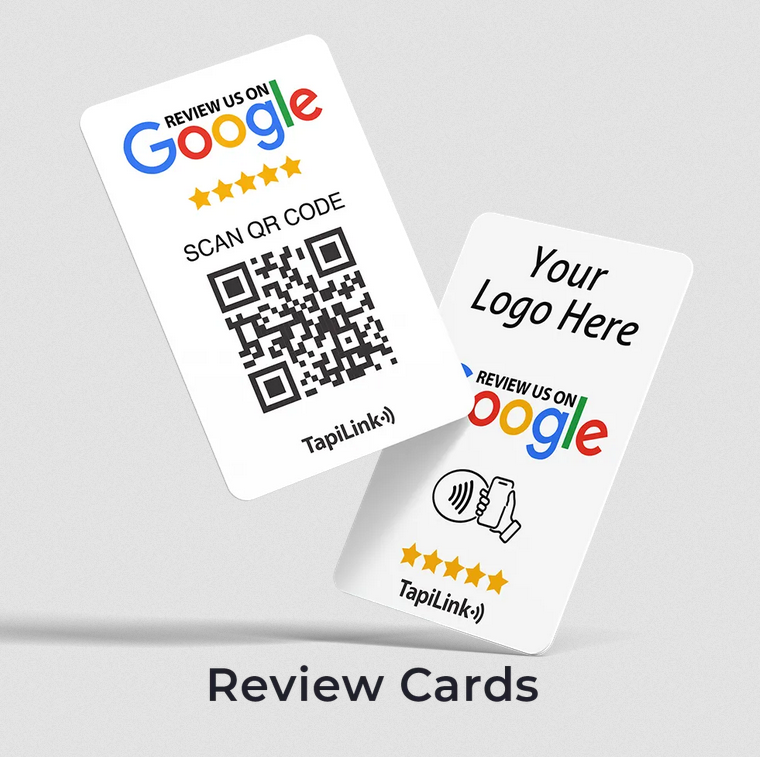
Online reviews have become a crucial factor in building a brand’s credibility. Among the many review platforms, Google Reviews hold a special place because they directly impact a business’s online visibility and reputation. A google reviews card is an easy and effective way to encourage customers to leave reviews while making it convenient for them to do so.
In this article, we will explore everything about Google Reviews Cards—what they are, how to create them, their benefits, and how they can significantly impact your business.
What is a Google Reviews Card?
Definition and Purpose
A Google Reviews Card is a digital or printed card that contains a direct link or QR code that takes customers straight to your Google Reviews page. This eliminates the hassle of searching for your business manually on Google, making it easier for customers to leave feedback.
How It Works
A Google Reviews Card simplifies the review process by providing a direct, easy-to-access link. Here’s how it works:
- The business generates a Google Reviews link from their Google My Business (GMB) profile.
- The link is embedded in a QR code or a clickable button.
- The card is shared through digital and physical platforms (emails, social media, business cards, etc.).
- Customers scan or click the link and are directed to the review page, where they can leave their feedback.
Benefits for Businesses
- Encourages more customer reviews
- Saves time by eliminating complicated steps
- Improves brand credibility through genuine customer feedback
- Enhances user experience with a seamless review process
How to Create a Google Reviews Card?
Step-by-Step Guide
- Access Google My Business (GMB):
- Log in to your Google Business Profile.
- Select the business location you want to generate reviews for.
- Click on “Get More Reviews” in your GMB dashboard.
- Copy the direct Google Reviews link.
- Use free tools like QR Code Generator to create a QR code linked to your review page.
- Use tools like Canva, Adobe Spark, or Photoshop to design an attractive digital or physical card.
- Include:
- Your business logo
- A call-to-action (e.g., "Scan to leave a review!")
- A QR code or clickable link
- Share it online (social media, emails, website).
- Print and place it in your store, on receipts, or as part of promotional materials.
Benefits of Using Google Reviews Cards
- Enhancing Brand Credibility
A business with multiple positive Google Reviews is perceived as more reliable and trustworthy. Customers rely heavily on these reviews before making a purchase.
- Boosting Customer Trust
People trust online reviews just as much as personal recommendations. A Google Reviews Card makes it easy for satisfied customers to share their experiences.
- Improving Local SEO Rankings
Google rewards businesses with high engagement and frequent positive reviews by ranking them higher in local search results.
- Increasing Conversion Rates
The more reviews a business has, the more potential customers feel confident about purchasing or visiting the business.
Where to Share Your Google Reviews Card?
- Social Media Platforms
- Post it on Facebook, Instagram, LinkedIn, and Twitter.
- Include it in Instagram Stories or Highlights.
- Business Website
- Add it as a pop-up or banner on your website.
- Include it on the contact or testimonials page.
- Email Marketing Campaigns
- Insert the review card in thank-you emails.
- Attach it to newsletters or promotional campaigns.
- Printed Materials
- Place it on business cards and flyers.
- Print it on receipts or invoices.
Best Practices for Using Google Reviews Cards
- Encourage Authentic Reviews – Never force or fake reviews.
- Engage with Customers – Always respond to reviews, whether positive or negative.
- Keep It Visible – Regularly share and update your Google Reviews Card.
- Personalize Your Approach – A handwritten note or special request can boost responses.
How Google Reviews Impact Local SEO?
Google uses reviews, ratings, and engagement as major factors for ranking local businesses. Higher ratings and frequent reviews can:
- Improve search engine rankings
- Increase visibility in Google Maps
- Drive more organic traffic
A Google Reviews Card is a powerful tool to enhance your online reputation, boost customer trust, and improve your local SEO. By making it easy for customers to leave feedback, you not only increase your credibility but also strengthen your brand’s online presence.
Contact:
Email: info@tapilink.co.uk
Tel: +44 2086 37 2179
Social Media:
https://www.facebook.com/tapilink
https://x.com/tapi_link
https://www.instagram.com/tapi.link
https://www.linkedin.com/company/tapilink/
https://www.tiktok.com/@tapilink
https://www.youtube.com/@TapiLink

 Arabic
 Français
 Español
 Português
 Deutsch
 Türkçe
 Dutch
Dutch
 Italiano
 Russian
 Romaian