


How Canonical Tags Prevent Duplicate Content Penalties
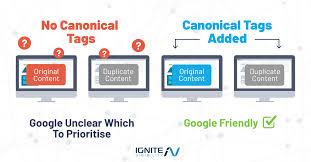
Explore How Canonical Tags Prevent Duplicate Content Penalties
Duplicate content is one of the most misunderstood challenges in search engine optimization. Many website owners assume that duplicate content always leads to penalties, while others ignore it completely until rankings start dropping. Over the years, I have seen both extremes cause problems. The truth lies in between. Search engines do not usually penalize duplicate content intentionally, but they do struggle to decide which version of a page should rank. This confusion can dilute visibility, waste crawl budget, and reduce overall SEO performance. Canonical tags exist to solve this exact problem. In this detailed article, I will explain how canonical tags work, how they prevent duplicate content issues, and why they are a core practice followed by the Leading SEO Agencies in the USA.
Understanding Duplicate Content in SEO
Duplicate content occurs when the same or very similar content is accessible through multiple URLs. This situation is common and often unintentional. For example, a single page may be accessible through HTTP and HTTPS, with or without www, or through URL parameters such as tracking codes and filters. Ecommerce websites face this issue frequently because category pages, sorting options, and pagination can generate many URL variations with identical content.
Search engines aim to show the most relevant and authoritative version of a page. When they encounter duplicate content, they must choose which URL to index and rank. This choice may not always align with your business goals. Instead of a penalty, the real risk is ranking dilution, where authority signals like links and relevance are split across multiple URLs.
What Are Canonical Tags
A canonical tag is an HTML element placed in the head section of a webpage. It tells search engines which version of a page should be considered the primary or preferred version. The canonical tag does not remove duplicate pages from the web, but it consolidates ranking signals to a single URL.
In simple terms, canonical tags act as a suggestion to search engines, saying this is the main version of this content. When implemented correctly, they help search engines understand your site structure more clearly and reduce confusion caused by duplicate URLs.
How Search Engines Interpret Canonical Tags
Search engines like Google use canonical tags as strong signals, but not absolute commands. If the canonical tag points to a page that is irrelevant or inconsistent with the content, search engines may ignore it. This is why accuracy and consistency are critical.
When search engines accept a canonical tag, they consolidate signals such as backlinks, internal links, and content relevance to the canonical URL. This improves the likelihood that the correct page ranks in search results and receives organic traffic.
How Canonical Tags Prevent Duplicate Content Problems
Canonical tags prevent duplicate content issues by clarifying which URL should represent a set of similar pages. Instead of search engines treating each duplicate URL as a separate page, they group them together under the canonical version. This prevents ranking signals from being divided.
For example, if a product page exists with multiple URL parameters for tracking or sorting, all those variations can point to a single clean canonical URL. As a result, authority flows to one page rather than being scattered across many versions.
Common Causes of Duplicate Content That Canonical Tags Fix
Duplicate content does not always come from copying content intentionally. Some of the most common technical causes include URL parameters, session IDs, printer-friendly versions, and content syndication. Even content management systems can create duplicate URLs automatically.
Canonical tags are especially useful in these scenarios because they allow all versions to exist while still consolidating SEO value. This approach is more flexible than blocking pages entirely, which can sometimes remove useful content from search results.
Canonical Tags vs Noindex Tags
One common mistake is confusing canonical tags with noindex directives. A canonical tag tells search engines which page should be prioritized, while noindex tells them not to index a page at all. Using noindex on pages that still have value can reduce visibility and waste potential authority.
Canonical tags are generally safer for managing duplicate content because they preserve link equity and relevance signals. Noindex should be reserved for pages that truly do not belong in search results, such as internal search pages or temporary test URLs.
Self Referencing Canonical Tags and Their Importance
A self-referencing canonical tag points to the same URL it is placed on. While this may seem unnecessary, it provides clarity and consistency. Self-referencing canonicals help protect pages from accidental duplication caused by URL parameters or external links.
Search engines recommend self-referencing canonical tags as a best practice because they clearly define the preferred version of each page. This becomes especially important during site migrations or redesigns.
Canonical Tags in Ecommerce and Large Websites
Large websites face duplicate content challenges at scale. Ecommerce sites often generate thousands of URLs for the same products through filters, sorting options, and category paths. Without canonical tags, search engines may index low value variations instead of core product pages.
Canonical tags allow ecommerce sites to control which URLs should rank while still offering flexible navigation for users. This balance between usability and SEO is critical for long-term performance.
Canonical Tags and Content Syndication
Content syndication is another area where canonical tags are essential. When content is republished on partner websites, canonical tags can signal the original source. This helps search engines attribute authority correctly and reduces the risk of outranking by syndicated versions.
Without canonical tags, search engines may struggle to identify the original publisher, especially if the partner site has stronger domain authority. Proper canonical implementation protects original content ownership.
Implementation Best Practices for Canonical Tags
Canonical tags should always point to a clean, indexable URL. The canonical URL must return a 200 status code and should not redirect. Avoid pointing canonical tags to URLs blocked by robots.txt or marked with noindex.
Consistency is also important. Canonical tags should align with internal linking, sitemap URLs, and preferred URL settings. Conflicting signals reduce trust and may cause search engines to ignore canonical hints.
Common Canonical Tag Mistakes
One frequent mistake is using canonical tags to hide low-quality pages instead of improving or removing them. Canonical tags are not a substitute for content quality. Another issue is pointing all pages to the homepage, which removes topical relevance and confuses search engines.
Using multiple canonical tags on a single page is also problematic. Each page should have only one canonical URL. Regular audits help identify and fix these issues before they impact rankings.
Monitoring Canonical Tags Through Search Console
Canonical performance should be monitored regularly using Google Search Console. Search Console shows which URL Google has selected as the canonical, which may differ from your declared canonical. These reports help identify mismatches and technical issues.
Monitoring ensures that canonical tags are being respected and that search engines are indexing the correct URLs. It also helps detect problems early, especially after site updates or migrations.
Canonical Tags and Crawl Budget Optimization
Canonical tags indirectly support crawl budget optimization. When search engines understand which pages matter most, they spend less time crawling duplicate URLs. This allows crawlers to focus on new and updated content.
For large websites, efficient crawling can make a noticeable difference in how quickly changes are indexed and reflected in search results.
Canonical Tags From an EEAT Perspective
From an experience and trust standpoint, canonical tags contribute to a cleaner and more reliable search presence. Users are more likely to land on consistent, authoritative pages rather than fragmented duplicates. This consistency supports credibility and long-term engagement.
Clear canonical signals also reflect technical expertise and attention to detail, which align with broader quality guidelines used by search engines.
Real World Impact of Proper Canonical Usage
In real audits, fixing canonical issues often leads to improved rankings without changing content. Consolidating duplicate URLs can restore lost visibility and improve click-through rates. These gains usually appear gradually as search engines reprocess canonical signals.
Canonical tags are not a quick fix, but they are one of the most effective long-term solutions for duplicate content management.
Final Thoughts
Canonical tags play a critical role in preventing duplicate content issues by guiding search engines toward the correct version of a page. They help consolidate ranking signals, reduce crawl waste, and protect visibility. When implemented thoughtfully and monitored regularly, canonical tags strengthen SEO foundations rather than masking deeper issues.
Duplicate content is a technical challenge, not a punishment. Canonical tags provide clarity where confusion exists. By focusing on accuracy, consistency, and alignment with site structure, websites can avoid ranking dilution and maintain stable search performance over time.
FAQs (Frequently Asked Questions)
Do canonical tags completely remove duplicate pages from search results
Canonical tags do not remove duplicate pages from the web. Instead, they signal which page should be treated as the primary version. Search engines may still crawl duplicate URLs, but ranking signals are consolidated toward the canonical page.
Can canonical tags cause ranking drops if implemented incorrectly
Yes, incorrect canonical implementation can cause ranking issues. Pointing canonicals to irrelevant pages, blocked URLs, or non-indexable pages can confuse search engines and reduce visibility instead of improving it.
Should every page have a canonical tag
Most indexable pages should include a canonical tag, including self-referencing canonicals. This provides clarity and protects against unintentional duplication caused by URL variations or external linking.
Are canonical tags better than redirects for duplicate content
Canonical tags and redirects serve different purposes. Canonicals are better when multiple versions need to exist for users. Redirects are better when duplicate pages are no longer needed. Choosing the right approach depends on user experience and site structure.
How long does it take for canonical tags to work
Canonical tags are processed gradually as search engines crawl and reindex pages. Changes may take several weeks to reflect fully in search results, depending on site size, crawl frequency, and overall technical health.
Can canonical tags be used across different domains
Yes, canonical tags can be used across domains to indicate the original source of content. This is commonly used in content syndication scenarios where the same article appears on multiple websites. When implemented correctly, cross-domain canonicals help search engines consolidate authority and identify the primary publisher.
Do canonical tags work for paginated pages
Canonical tags can be used for paginated content, but they must be applied carefully. Each paginated page usually needs a self-referencing canonical rather than pointing all pages to page one. This helps search engines understand content depth without collapsing useful pages into a single URL.
What happens if Google ignores a canonical tag
If Google ignores a canonical tag, it typically means conflicting signals exist. This may include inconsistent internal linking, different content between URLs, or technical issues. In such cases, Google selects its own canonical based on signals it trusts more.
Are canonical tags necessary for HTTPS and HTTP versions
Yes, canonical tags are important when both HTTP and HTTPS versions are accessible. They help search engines understand which version is preferred. However, proper redirects should also be in place to reinforce the canonical choice and ensure consistent indexing.
Can canonical tags be applied dynamically
Canonical tags can be generated dynamically through CMS templates. While tools like tag managers can technically inject them, best practice is to include canonicals directly in the HTML source to ensure search engines see them immediately and consistently.

 Arabic
 Français
 Español
 Português
 Deutsch
 Türkçe
 Dutch
Dutch
 Italiano
 Russian
 Romaian