


Accounting Practice Management Software Overview
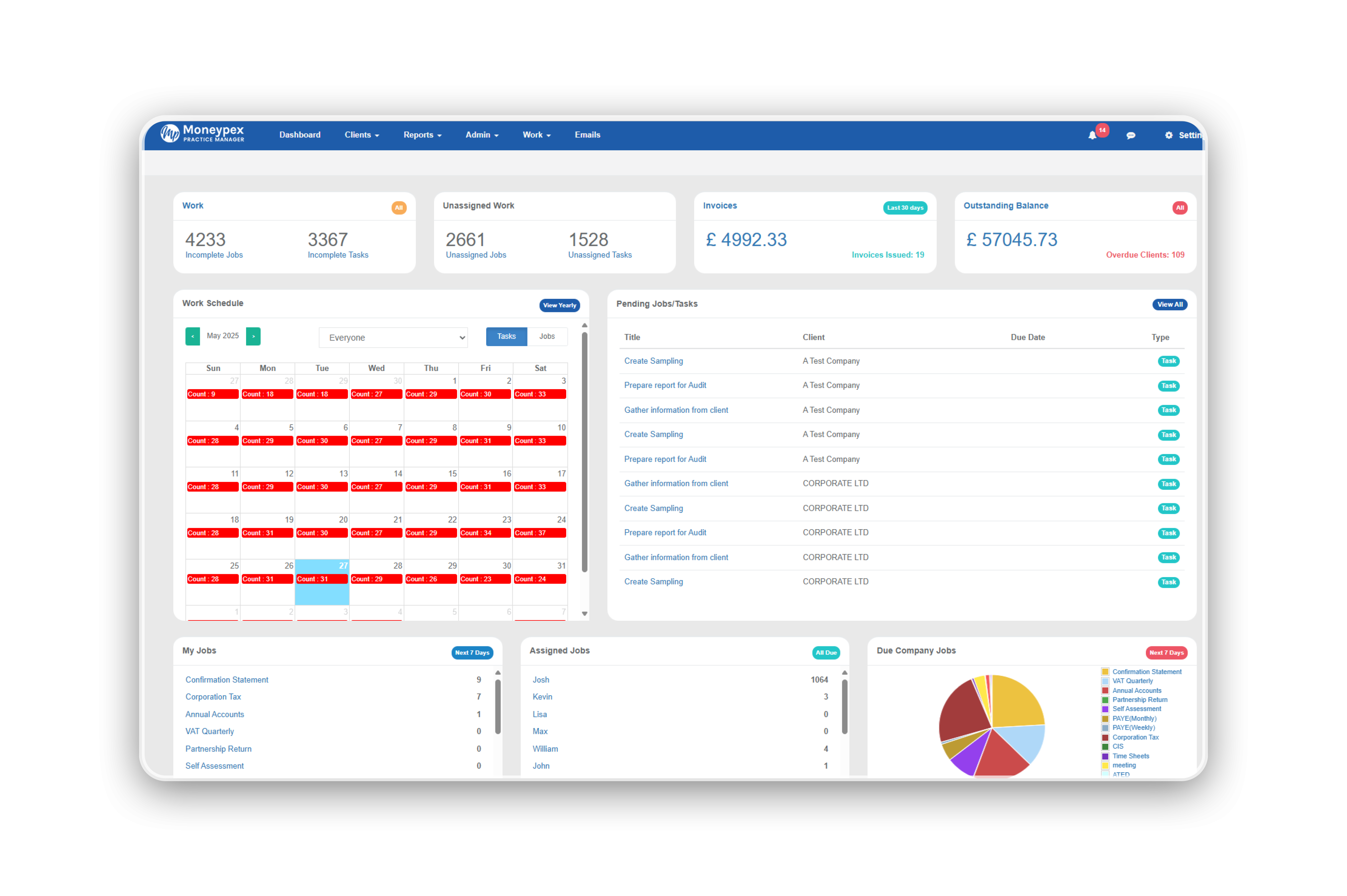
Running an Accounting Firm Without the Right Software Is Like Navigating Without a Map
You know where you want to go. You have the skills to get there. But without a clear view of where every client job stands, which deadlines are approaching, and whether your team has the capacity to deliver — you're making decisions in the dark.
That's the reality for thousands of accounting practices still relying on email chains, shared spreadsheets, and memory-dependent processes to manage their operations.
Accounting practice management software changes that entirely. This overview covers everything you need to understand about what the software category is, what it delivers, how it works in practice, and how to identify the right solution for your firm in 2026.
Whether you're evaluating platforms for the first time or reassessing your current setup, this is your complete starting point.
What Is Accounting Practice Management Software?
Accounting practice management software is a cloud-based SaaS platform designed specifically to manage the operational infrastructure of an accounting or bookkeeping firm.
It is not accounting software. Xero, QuickBooks, Sage, and similar tools handle the financial work — the bookkeeping, tax calculations, and reporting. Practice management software handles everything that surrounds that work: the coordination, scheduling, communication, billing, and team management that makes delivering client services possible at scale.
A complete cloud accounting practice management software solution typically unifies:
- Client relationship management — centralised profiles, contact history, engagement records
- Job and workflow management — recurring job scheduling, task assignment, progress tracking
- Time recording and WIP management — capturing billable hours linked to specific client jobs
- Invoicing and billing — generating invoices from time records and fixed-fee structures
- Document management — secure storage, version control, and client-facing portals
- Team coordination — capacity planning, workload visualisation, performance monitoring
- Compliance tracking — deadline management, HMRC submission monitoring, AML workflows
The defining characteristic of the best platforms is that these capabilities aren't separate modules bolted together — they function as a single, coherent operational system.
Who is it designed for?
- Sole practitioners managing 30 or more clients
- Small and mid-sized practices with growing teams
- Multi-partner firms handling complex, multi-service client relationships
- Bookkeeping firms managing high client volumes with recurring service schedules
- Any accounting business transitioning from manual processes to a cloud-first operating model
Why Accounting Practice Management Software Matters More Than Ever in 2026
The UK accountancy sector is navigating a period of compounding change. MTD (Making Tax Digital) is expanding its scope. The ICB and ICAEW are tightening quality expectations. Business clients — used to digital-first experiences with their banks and suppliers — now expect the same from their accountant.
Against this backdrop, accountancy practice management software has shifted from a productivity tool to a competitive necessity.
Several 2026-specific dynamics are driving this shift:
Regulatory Complexity — MTD phase expansion means more clients require digital filing workflows. Practices without systematic deadline tracking and submission monitoring face increasing compliance risk.
AI Integration — Leading practice management software for accounting firms now embeds AI for capacity forecasting, at-risk job flagging, and intelligent workload distribution. The efficiency gap between AI-enabled and legacy systems is widening.
Remote and Hybrid Working — Distributed teams require shared, cloud-based visibility of client work. Local or server-based systems can no longer support how modern accounting teams operate.
Client Experience Expectations — Secure portals, digital document signing, and real-time job status updates are becoming standard expectations among business clients. Practices that cannot offer this are commercially disadvantaged.
Talent Retention — Accounting staff increasingly factor technology quality into employment decisions. Outdated, frustrating systems contribute to turnover in a market where finding and keeping good people is genuinely difficult.
Key Features and What They Actually Deliver
Understanding features in isolation is less useful than understanding the outcomes they create. Here's what the core capabilities of accounting firm practice management software translate to in practice:
Automated Workflow Management
- Recurring jobs are created automatically on schedule — no manual initiation required
- Workflow stages advance based on defined triggers, not manual status updates
- Automated escalations fire when jobs approach deadlines without progressing
- Outcome: Deadlines are met consistently, even during peak periods and staff absences
Integrated Time Tracking and Billing
- Time is logged directly within job workflows, removing the friction of separate tools
- WIP dashboards show real-time billable hours versus budget for every active job
- Invoices are generated automatically from time records upon job completion
- Outcome: Revenue leakage is eliminated; billing accuracy improves immediately
Client Portal and Communication Automation
- Clients access a secure, branded portal for document uploads, downloads, and signing
- Automated document requests and reminders go out without staff involvement
- Engagement letters and AML checks are completed digitally within the onboarding flow
- Outcome: Inbound email volume drops; client experience becomes consistently professional
Team Capacity and Performance Management
- Real-time dashboards show each team member's current workload and available capacity
- New work is distributed based on actual availability, not assumption
- Performance reporting reveals job completion rates, turnaround times, and utilisation rates
- Outcome: Bottlenecks are identified and resolved proactively; team wellbeing improves
Deep Integrations
- Native sync with Xero, QuickBooks, and Sage for seamless financial data flow
- Companies House integration for automatic company data population
- HMRC API connections for submission status monitoring
- Microsoft 365 and Google Workspace integration for calendar and email alignment
- Outcome: Data moves automatically between systems; manual re-entry errors are eliminated
How It Works: A Complete Practice Workflow in Action
Here's how a well-configured best accounting practice management software platform manages a client relationship from onboarding through to annual billing.
Step 1 — Client Onboarding A new limited company client is added. Companies House data populates automatically. An engagement letter is generated from a template, sent digitally, and returned with an e-signature. AML identity verification is completed and logged. All within the platform, without a single printed document.
Step 2 — Service Schedule Configuration The client's services — quarterly VAT returns, monthly management accounts, annual year-end accounts — are configured as recurring job templates. The system will create and assign each job automatically, on schedule, indefinitely.
Step 3 — Automated Job Execution When a VAT return job activates, the assigned team member is notified. The client receives an automated portal request for their records. Time is tracked as work proceeds. The job moves through defined stages — Preparation, Review, Client Approval, Filed — automatically updated as each step completes.
Step 4 — Quality Control and Approval The completed return enters a review stage. The senior accountant receives a notification, reviews the work digitally, and approves or returns it with comments. The entire review trail is logged and auditable.
Step 5 — Completion and Billing The return is filed. The job is marked complete. An invoice is generated from the logged time and sent through the portal. Payment status is tracked. The cycle resets automatically for the following quarter.
Every step is documented, visible to all relevant team members, and reproducible without any manual coordination.
Practice Management Software Across Different Firm Profiles
Sole Practitioners
The primary challenge is admin overwhelm — time spent on coordination, chasing, and billing that could be spent on client work. A clean, lightweight platform with strong automation and a client portal delivers immediate relief and creates the capacity to grow the client base without burning out.
Small Practices (2–8 Staff)
Visibility and coordination become critical when more than one person is delivering client work. Who is working on what? What's at risk this week? A platform with workflow boards, capacity planning, and integrated billing addresses these pain points directly.
Growing Mid-Tier Firms (8–25 Staff)
At this scale, governance and quality control matter alongside efficiency. Approval workflows, role-based access controls, detailed performance reporting, and robust integration architecture become essential rather than optional.
Compliance-Focused Tax Practices
HMRC integration, MTD tracking, and deep UK regulatory awareness are the primary requirements. Platforms like TaxCalc Practice Manager and AccountancyManager offer native advantages for practices where compliance is the core service.
Bookkeeping Businesses
High volumes of recurring, standardised work benefit enormously from bulk job creation and templated automation. A practice managing 300 monthly bookkeeping clients can run its entire job schedule with minimal manual intervention.
Addressing the Most Common Concerns About Adoption
"We've tried software before and it didn't work." Failed implementations almost always trace back to insufficient configuration, lack of team buy-in, or choosing a platform that didn't fit the firm's actual workflow complexity. The solution is a structured evaluation process, a realistic implementation timeline, and a designated platform champion who drives adoption.
"We can't afford to disrupt live client work during migration." Most platforms allow parallel onboarding — new clients go into the system immediately while existing clients migrate in batches. The disruption is manageable with proper planning and vendor support.
"Our team resists new technology." This is a change management challenge, not a technology one. Involving team members in the selection process, demonstrating how the software reduces their individual admin burden, and providing adequate training time significantly improves adoption rates.
"It seems expensive for what it is." The ROI calculation for practice management software for accountants typically looks like this: if the platform recovers even 10% of previously unbilled time across a team of four, it pays for itself within weeks. That's before accounting for the partner time saved in coordination and the client retention value of a more professional service experience.
Expert Guidance: Getting the Most From Your Platform
Configure before you go live, not after. Practices that spend two weeks mapping their services and building templates before migrating see dramatically better results than those who import a client list and figure out the rest as they go.
Make the portal non-negotiable from day one. Every new client should be set up on the portal from their first interaction with your firm. Retrofitting portal adoption onto existing clients is significantly harder than establishing it as the default from the start.
Use your WIP data within the first month. Don't wait until you feel settled in the system to start reviewing work-in-progress reports. The insights these reports surface — unbilled time, over-budget jobs, underpriced services — are available immediately and should inform decisions from the first week.
Connect your integrations fully, not just nominally. Many practices connect their Xero or QuickBooks integration but never verify that it's working bidirectionally. Test every integration with real data before relying on it operationally.
Schedule a quarterly platform review. The most effective practices treat their practice management platform as a living system — reviewing templates, refining workflows, and activating underused features on a regular cycle. Book a 90-minute team review every quarter and approach it with genuine curiosity about what's not working optimally.
FAQs
What does accounting practice management software actually do? It manages the operational side of running an accounting firm — client records, job scheduling, task assignment, time tracking, billing, document handling, team coordination, and compliance deadline management — in a single cloud-based system.
How is it different from accounting software like Xero or QuickBooks? Accounting software manages financial data — bookkeeping, tax calculations, financial reports. Practice management software manages the operations of delivering that work — who does it, when, at what cost, and how clients experience the process. The two categories are complementary and work best when integrated.
How much does accounting practice management software cost in the UK? Entry-level platforms start from around £29–£69 per month. Mid-tier platforms typically range from £40–£80 per user per month. Most offer free trials. Given the ROI from improved billing and reduced admin, the investment is straightforward to justify for most practices.
How long does it take to implement? Most practices are operationally functional within two to four weeks. Full adoption — consistent team usage, refined templates, and optimised workflows — typically takes two to three months.
Is cloud-based practice management software secure enough for sensitive client data? Yes. Reputable platforms use bank-grade encryption, two-factor authentication, role-based access controls, and are typically ISO 27001 certified. For most practices, cloud-based storage offers greater security than local servers or shared drives.
Conclusion: A Complete Overview — and a Clear Next Step
Accounting practice management software is the operational foundation on which modern, scalable, and profitable accounting firms are built. It replaces reactive, person-dependent processes with a system that runs consistently — delivering better client experiences, more accurate billing, stronger team coordination, and the capacity to grow without operational chaos.
Whether you're exploring this category for the first time or looking to get more from an existing platform, the fundamentals are the same: the right system, properly configured and genuinely adopted, compounds in value over time.

 English
 Arabic
 Français
 Español
 Português
 Deutsch
 Dutch
Dutch
 Italiano
 Russian
 Romaian