


USB-A to USB-B Cable: The Complete Buying Guide for 2026
Introduction
Shopping for cables sounds simple until you're standing in front of a shelf full of options or scrolling through hundreds of listings online with no idea which one is actually right for your needs. The USB-A to USB-B cable might seem straightforward, but there are real differences between products that can affect performance, longevity, and compatibility. This guide breaks down everything you need to know before making your purchase in 2026.
Understanding the Basics
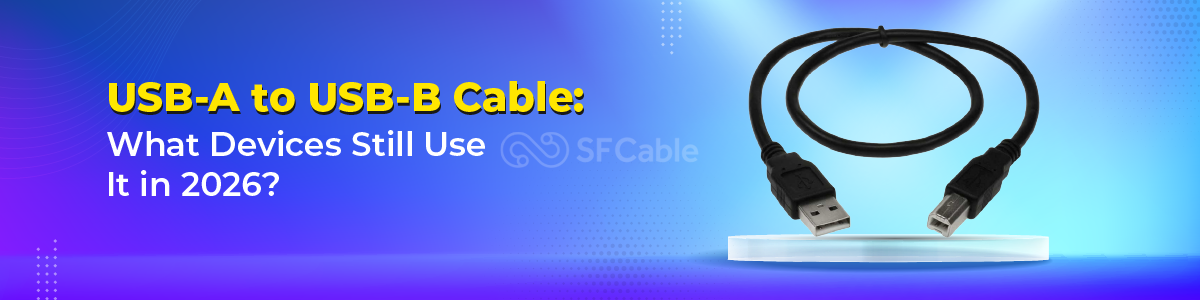
The USB-A to USB-B cable connects your computer or hub (via the USB-A end) to peripheral devices like printers, audio interfaces, and more (via the USB-B end). Despite being an older standard, it's still widely manufactured and sold because millions of devices still require it. When buying one, the key variables to consider are USB version, cable length, shielding, and connector quality.
USB 2.0 vs USB 3.0 Which Do You Need?
Most devices that use a USB-A to USB-B cable particularly printers and MIDI keyboards only need USB 2.0 speeds, which tops out at 480 Mbps. For these use cases, a standard USB 2.0 cable is perfectly adequate and often cheaper. However, if you're connecting an external hard drive enclosure or a device that transfers large amounts of data, you'll want to look for a USB 3.0 cable. USB 3.0 versions feature a distinct blue-colored USB-B connector with an additional row of pins. Make sure your device supports USB 3.0 before investing in the faster cable.
Cable Length Matters More Than You Think
USB cables have a maximum recommended length of about 5 meters (16 feet) for USB 2.0 before signal degradation becomes an issue. If you need a longer run, look for cables with active signal boosting built in. For most desktop setups, a 1.8-meter (6-foot) cable is the sweet spot long enough to give you flexibility in cable routing without excess slack. Shorter 1-meter cables work well in tight spaces where your devices are close together.
Shielding and Build Quality
This is where many budget cables fall short. A well-shielded USB-A to USB-B cable will resist electromagnetic interference, which is especially important in studio environments with lots of electronic equipment. Look for cables described as having braided shielding or double shielding. The connectors themselves should feel solid and snug loose or wobbly connections are a sign of poor manufacturing that will lead to intermittent connection issues over time.
Conductor Material
Inside every cable are copper conductors that carry data and power signals. Higher-quality cables use oxygen-free copper (OFC), which offers better conductivity and longer lifespan compared to standard copper. While OFC cables cost a bit more, they're worth it for devices that you plug and unplug regularly, or for situations where signal integrity matters, like audio interfaces and professional printing equipment.
Brand Recommendations
In 2026, brands like Anker, Cable Matters, AmazonBasics, and Monoprice continue to offer reliable USB-A to USB-B cables at reasonable prices. For professional audio or studio use, Hosa Technology makes well-regarded cables that are specifically designed for electronic music equipment. If you're in a budget-conscious environment, Cable Matters offers excellent value without sacrificing build quality.
Certifications to Look For
When browsing listings, look for cables that are certified by the USB Implementers Forum (USB-IF). This certification means the cable has been tested to meet official USB standards for performance and safety. While many uncertified cables work just fine, a certified cable gives you an added layer of assurance, especially for professional or business use where reliability is critical.
Avoiding Common Buying Mistakes
One of the most common mistakes people make is buying a USB-B cable when they actually need a USB Mini-B or USB Micro-B cable. The USB-B connector is the large, square-ish one it's noticeably bigger than Mini or Micro variants. Always check your device's port before ordering. Another mistake is buying a cable that's longer than needed, which can create clutter and potential tripping hazards. Match your cable length to your actual setup.
Where to Buy
You can find USB-A to USB-B cables at virtually any electronics retailer, including Best Buy, Micro Center, and Fry's. Online, Amazon remains the most convenient option with the widest selection. For bulk purchases (IT departments, schools, studios), direct purchasing from Cable Matters or Monoprice often offers the best pricing. Always check reviews carefully when buying from third-party sellers on any platform.
Conclusion
A USB-A to USB-B cable might not be the most exciting purchase you'll make in 2026, but choosing the right one can save you headaches down the line. Consider your device's USB version, your setup's length requirements, and the build quality of the cable itself. A small investment in a well-made cable pays off quickly in reliability and peace of mind.
Original Article:- Click Here

 English
 Arabic
 Français
 Español
 Português
 Deutsch
 Türkçe
 Dutch
Dutch
 Italiano
 Romaian