


Understanding Storage for Post Production in Modern Workflows
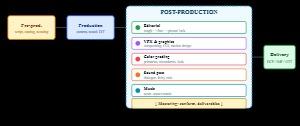
In modern media creation, storage for post production is no longer just a technical requirement sitting in the background. It has become a core part of the creative pipeline, directly influencing how smoothly editors, colorists, sound designers, and VFX artists can work. As production formats grow larger and resolutions move toward 4K, 6K, and even 8K, the demand for reliable, scalable, and high-speed storage systems continues to rise.
For a full-service post-production environment like PostProduction Studio, where raw footage is transformed into polished, broadcast-ready content across film, television, digital media, advertising, and online platforms, storage decisions can shape both efficiency and creative freedom.
Why Storage Architecture Matters in Editing Pipelines
Storage for post production plays a foundational role in how editing pipelines function from ingest to final delivery. Every stage—whether it is video editing, color grading, VFX compositing, or sound design—relies on constant access to large media files.
A well-structured storage architecture ensures that multiple team members can access the same assets without delays or conflicts. In collaborative environments, especially when working with filmmakers, agencies, and content creators at the same time, storage becomes the backbone of workflow stability.
Poorly designed systems often lead to lag, dropped frames, and inconsistent playback. On the other hand, optimized storage for post production allows real-time editing and seamless collaboration, even when working with high-resolution footage or complex layered compositions.
Modern workflows typically depend on a combination of high-speed SSDs, shared network storage, and backup archives. Each layer serves a different purpose, ensuring that active projects remain fast while older assets remain secure and accessible.
Differences Between Local and Network Storage Systems
One of the most important decisions in storage for post production is choosing between local storage and network-based systems.
Local storage refers to drives physically attached to a workstation. These are often fast and ideal for individual editors working on smaller projects or specific tasks. However, they limit collaboration because files are tied to a single machine.
Network storage systems, on the other hand, are designed for shared access. Multiple users can work on the same project simultaneously, which is essential in a professional post-production environment. This setup is especially important for studios handling multiple deliverables across different platforms.
In a studio like PostProduction Studio, where teams handle video editing, motion graphics, sound design, and VFX simultaneously, network-based storage for post production ensures that every department can access the same media without duplication or version conflicts.
Another key difference lies in scalability. Local storage is limited by physical hardware, while network systems can expand as project demands grow. This makes network solutions more suitable for long-term production workflows and large-scale media operations.
How Storage Impacts Rendering and Playback Performance
Rendering and playback are two of the most resource-intensive processes in post-production. The efficiency of both depends heavily on how well storage for post production is optimized.
When storage speeds are slow, editors experience delays while scrubbing timelines or previewing effects-heavy sequences. This interrupts creative flow and increases production time. High-performance storage systems, however, allow smooth playback even with multiple layers of video, audio tracks, and visual effects.
Rendering performance is also directly affected. When files are quickly accessible, rendering engines can process data more efficiently, reducing export times. This is especially important when delivering content for multiple platforms such as broadcast, social media, and cinematic distribution.
In environments that prioritize storytelling and visual quality, like PostProduction Studio, optimized storage for post production ensures that creative decisions are not limited by technical constraints. Editors can experiment freely with effects, transitions, and color grading without worrying about system lag.
Common Bottlenecks in Post Production Storage Setup
Despite advancements in technology, many workflows still face bottlenecks related to storage for post production. These issues often arise from poor planning, outdated infrastructure, or mismatched hardware.
One common issue is insufficient read/write speed. When storage devices cannot keep up with high-resolution footage, playback becomes choppy and rendering slows down significantly.
Another bottleneck is network congestion. In shared environments, multiple users accessing large files simultaneously can overload the system if bandwidth is not properly managed. This results in delays and reduced productivity.
Fragmented storage architecture is another challenge. When assets are scattered across multiple drives without a clear structure, it becomes difficult to manage versions and maintain consistency across projects. This is particularly problematic in complex workflows involving VFX, sound design, and multi-format deliverables.
Backup inefficiency also plays a major role. Without a structured backup strategy, valuable project data can be at risk, leading to delays and potential loss of work.
Addressing these bottlenecks requires a balanced approach to storage for post production, combining speed, scalability, and data security in a unified system.
Conclusion
Effective storage design directly influences editing speed, collaboration efficiency, and final output quality in professional post production environments.Another bottleneck is network congestion. In shared environments, multiple users accessing large files simultaneously can overload the system if bandwidth is not properly managed. This results in delays and reduced productivity.
Fragmented storage architecture is another challenge. When assets are scattered across multiple drives without a clear structure, it becomes difficult to manage versions and maintain consistency across projects. This is particularly problematic in complex workflows involving VFX, sound design, and multi-format deliverables.
Backup inefficiency also plays a major role. Without a structured backup strategy, valuable project data can be at risk, leading to delays and potential loss of work.
 Deutsch
 English
 Arabic
 Français
 Español
 Português
 Türkçe
 Dutch
Dutch
 Italiano
 Russian
 Romaian