


Transforming Small Business Logos for Embroidery
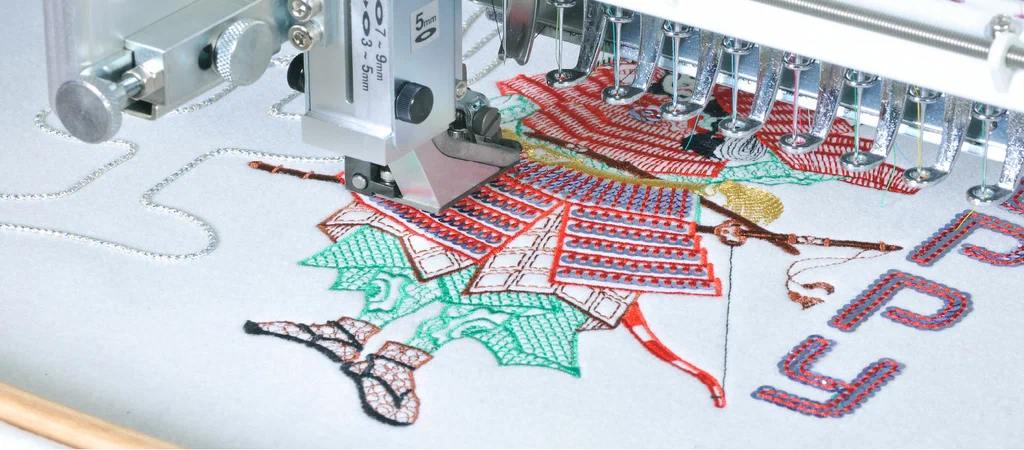
You have spent weeks perfecting your brand logo, selecting the exact colors and sharp geometric lines that represent your business. But when you try to sew that crisp digital graphic onto a polo shirt, it turns into an unreadable, messy blob of thread. Why does transitioning from a digital screen to physical fabric feel so difficult? The reality is that computer screens can display tiny details that physical needles and threads simply cannot replicate. To make your brand look professional, you need to understand how embroidery digitizing converts a flat graphic into a dynamic, texture-filled design.
Actually, the shift from pixels to thread requires a total change in how you view your artwork. When you work with fabric, you are no longer dealing with flat color blocks, you are managing physical depth, thread tension, and moving material. If your digital files are not optimized for these physical forces, your embroidery machine will struggle to produce clean results. Here is the thing, you can easily save time and money by learning how to adjust your branding elements specifically for the embroidery machine before production begins.
Simplifying Complex Details for Better Thread Clarity
Standard graphic design elements often feature tiny elements like thin outlines, tiny text, or delicate gradient fades. If you try to translate those exact elements directly into an embroidery file, the needle will repeatedly pierce the same spot, creating a hole in your garment.
The truth is that you must simplify your small business logo to match the physical limitations of the thread. This means widening thin lines, removing tiny background elements, and enlarging small text until it is at least a quarter of an inch tall. Forcing a machine to stitch details that are too small will only result in broken threads and messy clumps of fabric. Over 57 percent of all logo reproduction errors happen because the original artwork was too complex for a standard needle size to navigate cleanly.
When you simplify your design layout, you give the thread enough space to lay flat and smooth. The needle can then create distinct, sharp shapes that catch the light correctly and stay readable from a distance. This simple adjustment to your logo design eliminates almost all production errors and keeps your brand looking incredibly sharp.
Adjusting Contrast and Color Choices for Fabric
High contrast is your best friend when preparing a logo for commercial embroidery digitizing. On a bright computer screen, subtle color shades might look distinct and beautiful, but those same tones will completely blend together when sewn onto fabric.
You actually want to choose thread colors that offer high contrast against the background garment fabric. Instead of using five different shades of the exact same color, stick to two or three distinct tones that stand out clearly. Relying on fewer, stronger colors makes the final embroidery look much cleaner and drastically reduces production setup times on the machine.
Many small business owners try to use every single color from their website layout, but that often ruins the physical garment. If your design file is set up correctly, a limited color palette will look premium because the texture of the thread creates its own natural shadows and highlights. This method also lowers your production costs, which helps your small business save money on large orders.
Managing Fabric Push and Pull Compensation
Fabric is flexible and shifts constantly while an embroidery machine is running at high speeds. As the needle drives thread into the garment, the fabric naturally bunches up horizontally and stretches out vertically. This physical movement is known in the apparel industry as the push and pull effect.
To handle this movement, your digital embroidery file must include built-in compensation to counteract the distortion. A professional designer will intentionally program circles to be slightly oval on the screen so they compress into perfect circles on the actual fabric. It creates a balanced blueprint that accounts for the movement of flexible materials like cotton shirts or stretchy performance fleece.
Honestly, it helps to know exactly what fabric type you plan to use before creating your production files. Heavy canvas jackets react very differently than thin polyester polo shirts, so your file needs to match the specific material. Taking these physical properties into account prevents your borders from drifting away from your solid fills during production.
Choosing the Right Stitch Types for Business Apparel
Different areas of your business logo require different types of stitching to look their absolute best. Small text requires smooth satin stitches, while large filled shapes need flat tatami stitches to cover the area without puckering the garment. Knowing how to apply these styles is the secret to creating corporate apparel that looks truly high end.
For lettering and fine borders, satin stitches are the industry standard choice. They wrap cleanly around the edges of shapes and provide a raised, glossy texture that stands out beautifully against corporate clothing. However, if your lettering gets too wide, the stitches will become loose and snag easily during daily wear.
When you face large solid shapes, use a flat fill stitch with a conservative density setting. Avoid long, open stitches on everyday work uniforms because they will not hold up well in standard laundry cycles. If you want to see how these professional stitch selections look on real garments, you can browse a live embroidery digitizing to inspect successful corporate projects.
Common Logo Conversion Mistakes to Avoid
The biggest mistake small business owners make is uploading a low resolution image and expecting a perfect embroidery file. Embroidery machines cannot read standard image files like JPEGs or PNGs, they require specialized coordinate paths to move the needle. You always need a dedicated digitizing process to translate those static pixels into real machine commands.
Another common error is adding thick outlines around every single element of your business logo. While outlines look great on a printed business card, they add massive stitch counts and unnecessary stiffness to an embroidered garment. It is often much better to let the solid shapes speak for themselves without framing them in heavy black thread.
Finally, do not forget to test your finished files on a scrap piece of the exact same fabric you plan to use for your final order. Because different fabrics shift in unique ways, a file that looks beautiful on heavy denim might pull apart on a lightweight polo shirt. Taking the time to run a quick test swatch ensures that your final production run turns out absolutely perfect.
Embroidery Digitizing Frequently Asked Questions
Why does my printed logo look different when embroidered?
Your printed logo looks different because printing places flat ink on top of fabric, while embroidery weaves thick threads directly into the material. Thread adds physical weight, height, and texture, which requires you to simplify small details and increase text sizes for clarity.
Can any graphic designer make embroidery files?
No, standard graphic designers generally create artwork using pixels or vectors, which embroidery machines cannot read. Creating a machine file requires specialized knowledge of fabric movement, stitch density, and underlay sequencing that only an experienced digitizing specialist possesses.
What is the minimum text size for embroidered business logos?
The safe minimum height for embroidered text on standard business apparel is a quarter of an inch. Anything smaller than this will cause the thread to clump together, making the words unreadable and increasing the risk of tearing the fabric.
How do I get a test sample of my logo design?
You can easily request a free embroidery design sample to see how your digital artwork translates into real stitches. This allows you to test the file quality on your own machinery before committing to a large production run.
Why are the outlines on my embroidered logo separating?
Outlines separate when the digital file lacks proper pull compensation for the specific fabric being used. Because stretchy fabrics pull inward during stitching, the outlines must be slightly overlapped in the digital file to ensure they align perfectly on the finished garment.
Transforming your corporate logo into a beautiful embroidered design is an excellent way to elevate your brand presence. By simplifying your small details, choosing high contrast thread colors, and accounting for fabric movement, you can create professional apparel. If you want to eliminate the guesswork and get retail ready results immediately, you can partner with the global experts. At Digitizing Studio, we bring over 18+ years of industry experience and have successfully completed 8,300+ projects for clients all over the world. We maintain an impressive 92 percent client retention rate because we focus on precision, speed, and exceptional customer service on every single order. Let us help you convert your business logo into a flawless embroidery file that makes your team stand out.
Author Bio Clara Higgins is a commercial apparel designer and embroidery digitizing expert with twelve years of experience managing corporate uniform programs. She specializes in brand asset conversion and helps small businesses optimize their logos for clean, high speed garment production.

 English
 Arabic
 Français
 Español
 Português
 Deutsch
 Türkçe
 Italiano
 Russian
 Romaian