


Cloud-Based Learning Management Software: Benefits, Features, and Use Cases
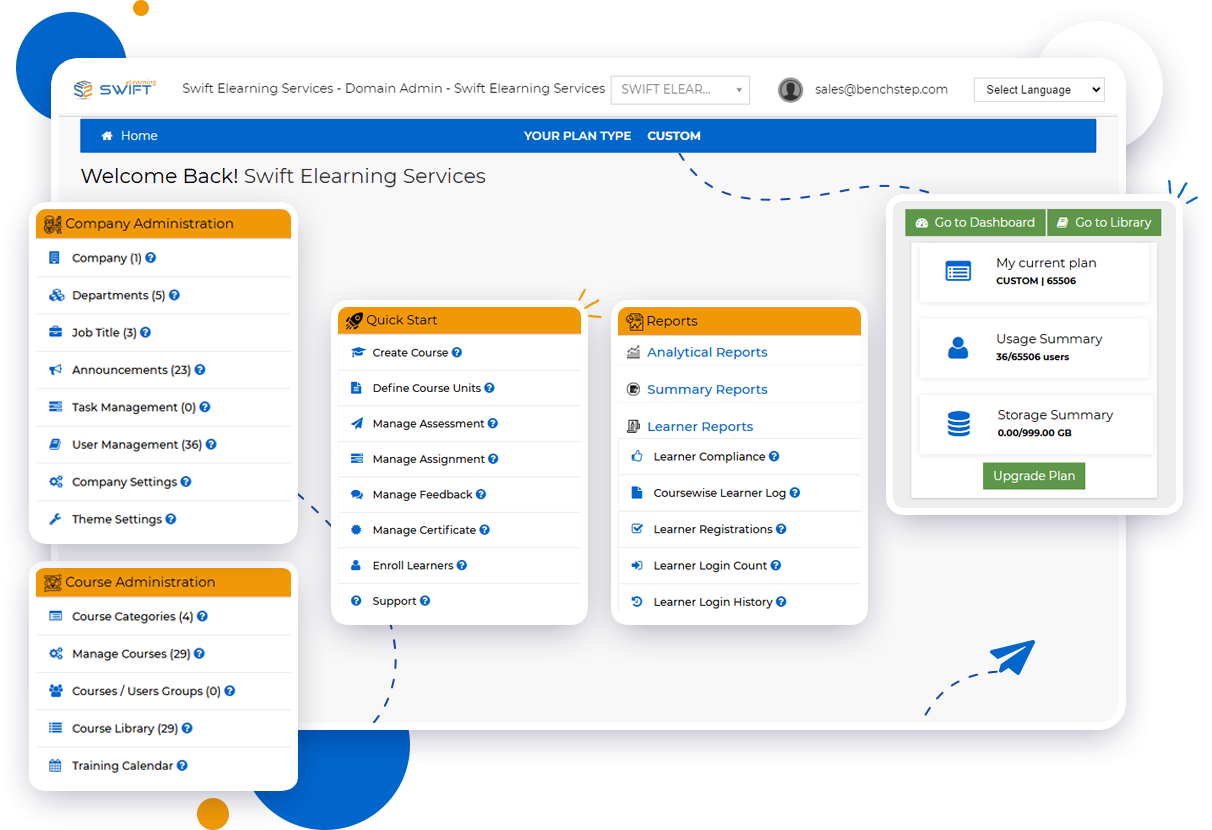
learning management software has become an important part of modern workplace learning, helping organizations deliver training without relying on complex, locally installed systems. Cloud-based platforms give employees, administrators, and instructors access to learning resources through the internet while centralizing course management, assessments, reporting, certifications, and learner data. For organizations looking to make corporate training more accessible, scalable, and measurable, a cloud-based approach can offer a practical foundation for long-term learning and development.
What Makes Cloud-Based LMS Platforms Different From Traditional Systems?
A cloud-based learning management system (LMS) is hosted online rather than installed and maintained on an organization’s individual servers. This means learners can access training from different locations and devices, while administrators can manage courses, users, and performance data from a centralized platform.
The difference is particularly valuable for distributed teams. Instead of depending on office-based infrastructure, organizations can provide consistent access to employee training across locations, departments, and time zones.
Modern LMS platforms can also support different learning formats, including self-paced courses, instructor-led training, webinars, videos, assessments, and interactive content.
Why Are Businesses Moving to Cloud-Based Learning Platforms?
One of the biggest advantages of cloud-based training software is flexibility. Organizations can expand their learning programs without continually investing in additional hardware or complicated infrastructure.
Key benefits include:
-
Anywhere, anytime access: Employees can complete training from desktops, tablets, or mobile devices.
-
Centralized training management: Courses, learner records, certifications, and reports can be managed in one place.
-
Scalability: The platform can support growing learner populations and expanding training requirements.
-
Reduced administration: Automated enrollment, reminders, assessments, and reporting can reduce repetitive manual tasks.
-
Real-time visibility: Managers can monitor learner progress, completion rates, assessment performance, and training activity.
-
Easier content management: Administrators can organize and update digital learning resources from a centralized environment.
For L&D teams, these capabilities can make it easier to connect training delivery with measurable organizational goals.
Which LMS Features Matter Most for Corporate Training?
Not every LMS offers the same capabilities. When evaluating a cloud-based platform, organizations should focus on features that support both current requirements and future learning strategies.
1. Course and Content Management
A strong LMS should make it easy to upload, organize, update, and distribute training content. Support for formats such as SCORM, xAPI, video, documents, and assessments can help organizations manage diverse learning experiences.
2. Learner Management and Role-Based Access
Role-based user management allows administrators to assign courses according to departments, job roles, teams, or other learner groups. This can make training more relevant while simplifying administration.
3. Assessments, Certifications, and Compliance Tracking
For regulated industries, training completion is only part of the equation. Organizations may also need to monitor assessment results, certification status, renewal dates, and mandatory training requirements.
Automated reminders and certification tracking can help reduce the risk of missed deadlines and incomplete compliance records.
4. Reporting and Learning Analytics
What happens after employees complete a course? Reporting and analytics help answer that question.
Useful LMS reports can provide insight into completion rates, learner activity, assessment performance, and course effectiveness. These insights allow L&D professionals to identify knowledge gaps and make more informed training decisions.
5. Mobile-Friendly Learning
Employees increasingly expect learning to fit into their schedules. Mobile accessibility allows learners to access courses and resources beyond the traditional workplace, supporting flexible and continuous learning.
6. Integrations and Customization
An LMS becomes more valuable when it can work alongside existing business systems. Integration with HR platforms and other organizational tools can reduce duplicate data entry and streamline learner management.
Customization can also help organizations align the learning environment with their branding, user roles, workflows, and training objectives.
How Can Organizations Use a Cloud-Based LMS?
The real value of an LMS becomes clearer when it is applied to practical business challenges.
Employee Onboarding
A cloud-based LMS can provide new employees with structured learning paths covering company policies, processes, tools, compliance requirements, and role-specific knowledge. Standardized onboarding can help ensure that every new hire receives essential information.
Compliance and Mandatory Training
Organizations can use LMS technology to assign required courses, monitor completion, manage certifications, and send renewal reminders. This creates a more organized approach to compliance training and record keeping.
Product and Sales Enablement
Sales teams need current product knowledge and consistent messaging. An LMS can centralize product courses, assessments, reference materials, and learning paths so teams can access updated information when needed.
Customer and Partner Training
Training does not always stop with employees. Businesses can create dedicated learning experiences for customers, distributors, vendors, and partners. This can support product adoption, consistent processes, and stronger external relationships.
Employee Upskilling and Continuous Learning
Organizations can create skill-based learning paths that support professional development. Microlearning, self-paced courses, assessments, and progress tracking can contribute to a continuous learning culture.
Is Cloud-Based Learning Management Software Right for Your Organization?
The answer depends on your training goals, learner population, existing technology, and administrative requirements. However, cloud-based LMS platforms are particularly useful for organizations that need centralized training management, remote accessibility, scalable delivery, and measurable learning outcomes.
Before choosing a platform, consider questions such as:
-
Can it support your current and projected number of learners?
-
Does it integrate with your existing HR or business systems?
-
Can it handle your preferred content formats?
-
Does it provide meaningful reports and analytics?
-
Can it manage certifications and compliance requirements?
-
Is the user experience intuitive for both administrators and learners?
-
Does the provider offer adequate implementation and ongoing support?
A thoughtful evaluation helps organizations select an LMS based on business requirements rather than simply choosing a platform with the longest feature list.
What Should the Future of Cloud-Based Corporate Learning Look Like?
Cloud technology is making workplace learning more connected, accessible, and data-driven. The next stage is not simply about putting courses online; it is about creating learning ecosystems that respond to employee needs and organizational priorities.
For L&D leaders, the strongest approach is to combine technology with sound instructional design, relevant content, learner engagement strategies, and measurable outcomes. A well-selected cloud LMS can provide the infrastructure, while effective learning strategy determines how successfully that infrastructure is used.
For organizations exploring a scalable approach to corporate training, Swift eLearning Services provides cloud-based LMS capabilities designed around course delivery, learner management, assessments, certifications, reporting, mobile accessibility, and workforce development.

 Arabic
 Français
 Español
 Português
 Deutsch
 Türkçe
 Dutch
Dutch
 Italiano
 Russian
 Romaian