


How to Hide Games on PS4?
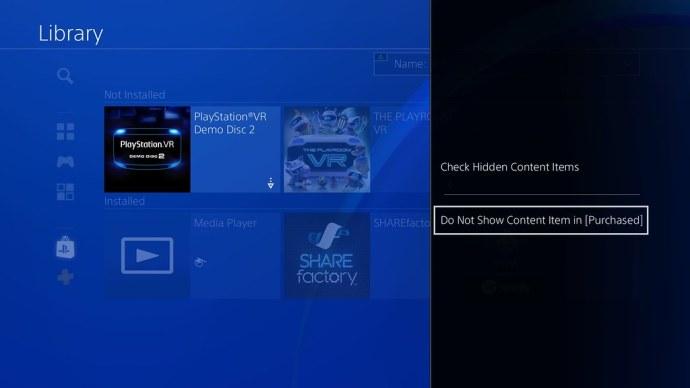
PS4 is one of the most popular home video gaming consoles by Sony. Over a period of time, users may end up purchasing several games, causing their libraries to get full. It can be challenging to find the game you want to play from an overstuffed library. You can hide games you don’t play on PS4. To know how to do that, read on and follow the steps given below:
Hide Games inside the Gaming Library
You can hide games inside the gaming library by following the steps mentioned below.
- First, enable PS4, then wait to load the Dashboard on your device.
- Then reach the Dashboard and move above to the Library.
- Once you get the Library section, navigate to the ‘Purchased’ option to view every game you have bought from your PSN account.
- You should reach any game that you would like to hide from this menu.
- Hold the Options button on the controller of PS4.
- You have to locate the ‘Do Not Show Content Item in (Purchased)’ option and select it.
Disclose Hidden Library Games
You can disclose hidden library games by following the steps mentioned below.
- Get back to the Library section.
- Then hit on the Options key on the controller.
- You should click on the ‘Check Hidden Content Items’ option.
- Now, you have to wait for the device to process the request, and you will be able to see every hidden game again.
Hide Games in the Activity Feed
You can hide games in the activity feed by following the steps mentioned below.
- Navigate to the menu of Profile on your system.
- Then reach the Games option and click on it.
- You should choose any game you want from the list.
- Now, hit the Options button on the controller.
- Later, select the ‘Hidden Games Settings’ option.
- You should click on the ‘Hidden Games for PS4’ option.
- Finally, pick the game that you would like to hide from the activity feed.
Disclose the Hidden Activity Feed Games
You can disclose the hidden activity feed games by following the steps mentioned below.
- First, access the menu of Hidden Games.
- Then untick every game that you would like to disclose again.
- Now, apply the changes by pressing the Confirm button.
Remove Games on the PS4
You can remove games on the PS4 by following the steps mentioned below.
- First, you have to go to the Library of PlayStation by following the above-mentioned steps.
- Select the game that you would like to remove.
- You should hit the button of options.
- After that, click on the ‘Delete’ button.
- Now, click on the OK button to verify.
Source :- https://directoryband.com/blog/how-to-hide-games-on-ps4/

 Arabic
 Français
 Español
 Português
 Deutsch
 Türkçe
 Dutch
Dutch
 Italiano
 Russian
 Romaian